
AWS Cloud Services Cheat Sheet - Complete Guide
Amazon Web Services (AWS) offers more than 200 comprehensive cloud services, which can be intimidating for beginners and experts alike. This visual guide organizes the main AWS services by category to help you navigate this complex ecosystem.
Overview of AWS Services by Category
The infographic below presents the essential AWS services organized by functional category:
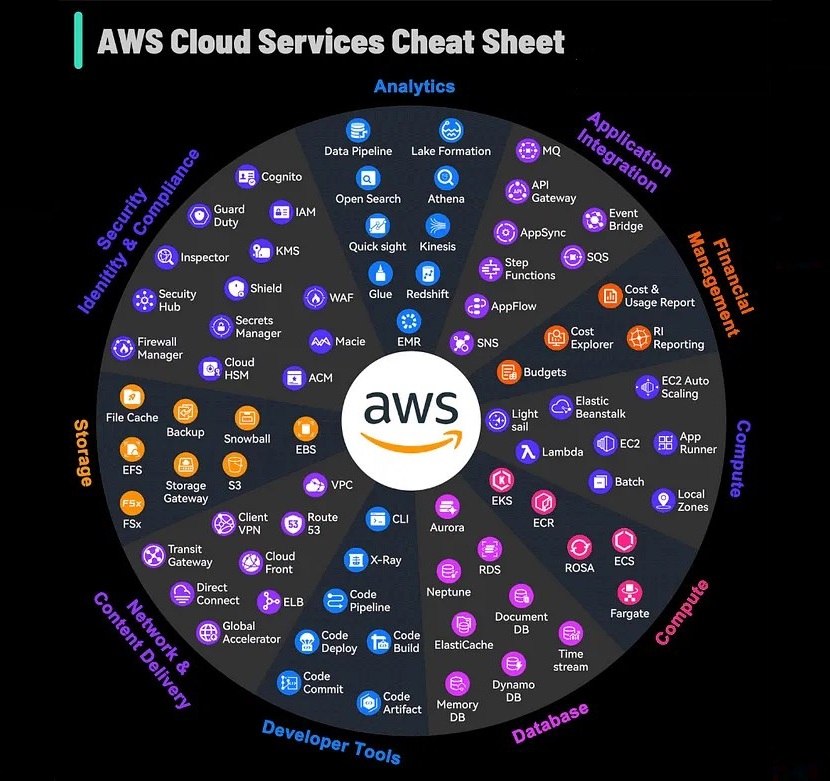
This mind map helps you quickly understand the AWS ecosystem and the relationships between the different services.
Identity & Security Compliance
Security is at the core of AWS infrastructure, with specialized services:
- IAM (Identity and Access Management): User and permission management
- KMS (Key Management Service): Creation and control of encryption keys
- Shield: Protection against DDoS attacks
- WAF (Web Application Firewall): Web application protection
- Security Hub: Unified security center
- Guard Duty: Threat detection service
- Inspector: Vulnerability scanning
- Secrets Manager: Secure secrets management
- Firewall Manager: Centralized administration of firewall rules
- Cloud HSM: Hardware security module in the cloud
Compute
AWS compute infrastructure offers a variety of options to fit your needs:
- EC2 (Elastic Compute Cloud): Configurable virtual machines
- Lambda: Event-driven serverless compute
- ECS (Elastic Container Service): Container orchestration
- EKS (Elastic Kubernetes Service): Managed Kubernetes
- Fargate: Serverless compute for containers
- Batch: Large-scale batch processing
- Lightsail: Simplified virtual instances
- EC2 Auto Scaling: Automatic instance scaling
- App Runner: Deployment of containerized applications
Storage
Storage solutions suited to different use cases:
- S3 (Simple Storage Service): Highly scalable object storage
- EBS (Elastic Block Store): Block storage for EC2
- EFS (Elastic File System): Elastic file system for Linux
- FSx: High-performance file systems
- S3 Glacier: Low-cost archival storage
- Storage Gateway: Hybrid on-premises/cloud integration
- Backup: Centralized backup service
- Snowball/Snowmobile: Large-scale data migration
Database
A wide range of specialized databases:
- RDS (Relational Database Service): Managed relational databases
- Aurora: MySQL/PostgreSQL-compatible relational database
- DynamoDB: High-performance NoSQL database
- ElastiCache: In-memory cache
- Neptune: Graph database
- DocumentDB: MongoDB-compatible document database
- Timestream: Time series database
- QLDB (Quantum Ledger Database): Immutable ledger database
Networking & Content Delivery
Global network infrastructure and content delivery:
- VPC (Virtual Private Cloud): Isolated virtual network
- Route 53: DNS and domain registration service
- CloudFront: Content delivery network (CDN)
- API Gateway: API creation and management
- Direct Connect: Dedicated connection to the AWS cloud
- Global Accelerator: Application performance improvement
- Transit Gateway: Centralized network connectivity
- ELB (Elastic Load Balancing): Automatic load balancing
Developer Tools
Tools for developers and automation:
- CodeCommit: Source control service
- CodeBuild: Build service
- CodeDeploy: Automated deployment service
- CodePipeline: Continuous integration and delivery service
- CodeStar: Unified development service
- X-Ray: Application analysis and debugging
- Cloud9: Cloud-based development environment
- CLI (Command Line Interface): Command-line interface
Analytics
Services for data analysis and Big Data:
- Athena: S3 data analysis service
- EMR (Elastic MapReduce): Big Data processing
- CloudSearch: Managed search service
- Elasticsearch Service: Managed Elasticsearch service
- Kinesis: Real-time data processing
- QuickSight: Business intelligence service
- Data Pipeline: Data flow orchestration
- Lake Formation: Data lake building
- Glue: ETL (Extract, Transform, Load) service
- MSK (Managed Streaming for Kafka): Managed Kafka service
Application Integration
Services for application integration:
- SNS (Simple Notification Service): Notification service
- SQS (Simple Queue Service): Message queuing service
- AppFlow: SaaS service integration
- EventBridge: Serverless event bus
- MQ: Message broker service
- Step Functions: Distributed application coordination
- SWF (Simple Workflow Service): Workflow orchestration
Finance Management
Services for cloud financial management:
- Cost Explorer: Cost visualization and management
- Budgets: Budget setting and tracking
- Cost & Usage Report: Detailed usage and cost reports
- RI (Reserved Instance) Reporting: Reserved Instance reports
Tips for Getting Started with AWS
- Start by understanding the core services: EC2, S3, RDS, VPC, and IAM
- Use the Free Tier to experiment without incurring significant charges
- Set up billing and cost alerts to avoid surprises
- Take a layered approach: infrastructure, platform, then specialized services
- Follow the principle of least privilege for security with IAM
- Use CloudFormation for infrastructure as code
- Take advantage of managed services rather than administering everything yourself
Common Architecture Patterns on AWS
Serverless Architecture
Client → API Gateway → Lambda → DynamoDB
                     ↓
                  S3 (static)
Microservices Architecture
Client → ALB → ECS/EKS (conteneurs) → RDS/DynamoDB
              ↓
          SQS/SNS (communication)
Classic Web Application Architecture
Route 53 → CloudFront → ALB → EC2 (Auto Scaling) → RDS
                          ↓
                       ElastiCache
Cost Optimization Best Practices
- Use Reserved Instances for predictable workloads
- Schedule development environments to shut down outside working hours
- Configure lifecycle policies for S3
- Monitor and delete unused resources
- Use Spot Instances for fault-tolerant workloads
- Set up cost monitoring with AWS Cost Explorer and Budgets
Going Further
This guide is only an introduction to the many AWS services. To deepen your knowledge:
- Consult the official AWS documentation
- Explore AWS’s Well-Architected Framework
- Take courses through AWS Training and Certification
- Experiment with hands-on projects to consolidate your knowledge

About InSkillCoach
Training and technology expert
Coach specializing in advanced technologies and AI, backed by GNeurone Inc.
Certifications:
- AWS Certified Solutions Architect – Professional
- Google Cloud certifications
- Microsoft Certified: DevOps Engineer Expert
- Certified Kubernetes Administrator (CKA)
- CompTIA Security+
Comments
Comments are powered by GitHub Discussions
Sign in with GitHub to join the discussion